System Architecture & Design Overview
Executive Summary
This section details the system architecture, component breakdown, and data communication patterns of the Chrome Flashcard Extension serverless application (chrome-flashcard-axiza) on Amazon Web Services (AWS). The Web Application frontend is hosted on AWS Amplify Hosting using its native global CDN distribution under the canonical custom domain https://www.axiza.net (with apex domain axiza.net HTTP/HTTPS redirecting to www.axiza.net), while the backend API utilizes the custom domain https://api.axiza.net, both managed via Amazon Route 53 with SSL/TLS certificates issued by AWS Certificate Manager (ACM).
Architectural Topology
The system employs an offline-first design pattern at the client layer coupled with a microservices-inspired serverless topology on AWS:
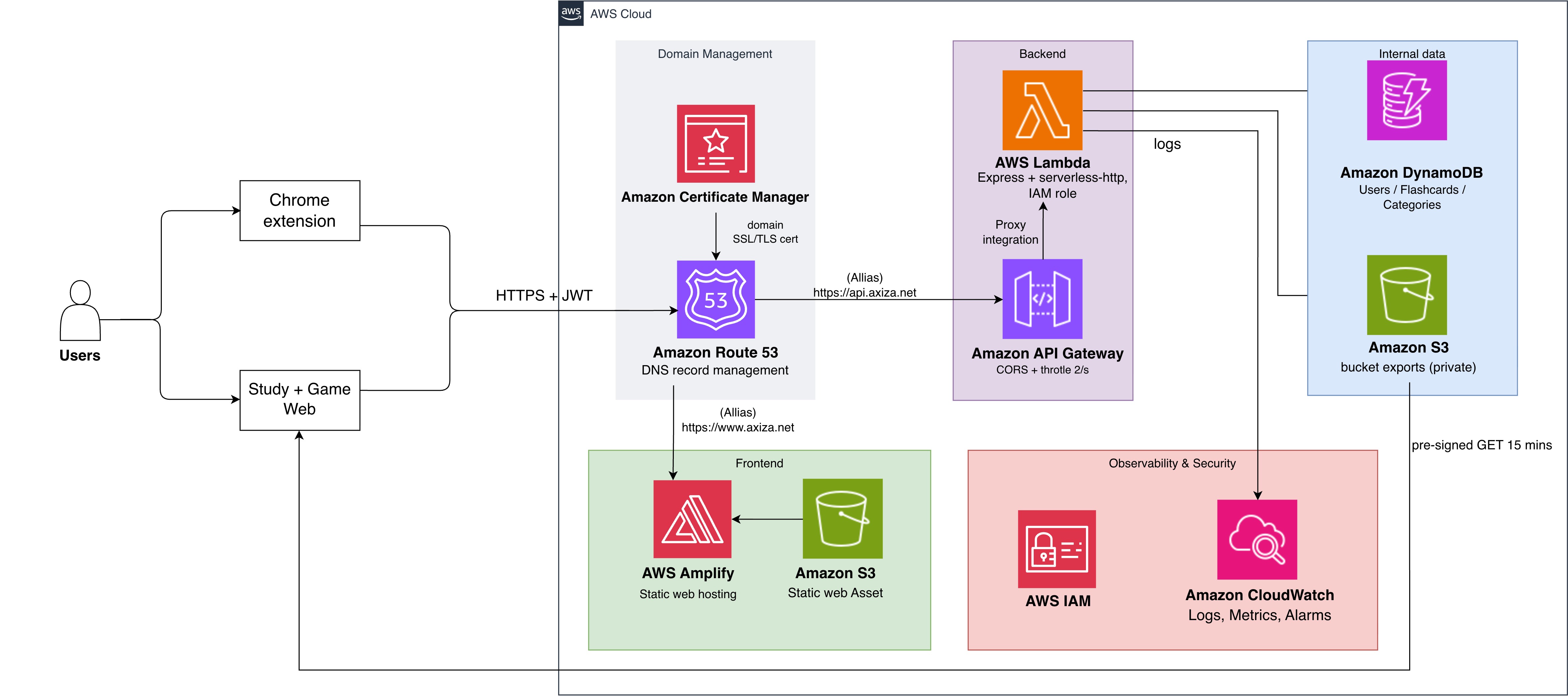
Detailed AWS Component Specifications
| Component | Architecture Role | Key Operational Specifications |
|---|---|---|
| AWS Amplify Hosting | Frontend Website Host | Serves frontend static web assets directly via native global edge nodes under canonical custom domain www.axiza.net. |
| Amazon Route 53 | DNS & Domain Routing | Manages public DNS records for Hosted Zone axiza.net, serving a CNAME record for www.axiza.net (Amplify CDN endpoint), apex HTTP/HTTPS redirection (axiza.net $\rightarrow$ www.axiza.net), and an Alias A/AAAA record mapping api.axiza.net to API Gateway Regional Domain Name (d-xxxx.execute-api...). |
| AWS Certificate Manager (ACM) | SSL/TLS Certificate Management | Provisions, manages, and automatically renews public SSL/TLS certificates for custom domains www.axiza.net, axiza.net, and api.axiza.net, ensuring transport layer HTTPS security. |
| API Gateway HTTP API | Public Gateway & Reverse Proxy | Enforces HTTPS on custom domain api.axiza.net, enforces throttling (20 req/s rate limit, 40 req/s burst limit), manages CORS preflight authorization for allowed origins (https://www.axiza.net, https://axiza.net, http://axiza.net, chrome-extension://...), and routes all requests via proxy integration (/{proxy+}) to Lambda. |
| AWS Lambda | Stateless Compute Layer | Executes an Express.js backend via serverless-http on Node.js runtime, offering scale-to-zero operational efficiency. |
| Amazon DynamoDB | Persistent Storage Layer | Fully managed NoSQL tables in PAY_PER_REQUEST (On-Demand) mode: UsersTable (PK: username), FlashcardsTable (PK: userId, SK: cardId), and CategoriesTable (PK: userId, SK: categoryName). |
| Amazon S3 | Private Document Store | Private encrypted S3 bucket dedicated exclusively to storing generated JSON data exports accessible via temporary 15-minute pre-signed GET URLs. |
| Amazon CloudWatch | Observability Platform | Captures execution logs, operational metrics, cold start timings, and system error rates for chrome-flashcard-axiza. |
Component Data Flow Analysis
- Vocabulary Acquisition Phase: The browser extension captures highlighted text via a context menu listener. The content script (
contentScript.js) renders an inline modal and persists records locally tochrome.storage.local. - Cloud Synchronization Phase: Upon user authentication or explicit sync initiation, the extension transmits accumulated local records via
POST https://api.axiza.net/api/syncrouted through Route 53 to API Gateway. Lambda verifies JWT credentials and executes batch operations against DynamoDB. - Interactive Practice Phase: The Study Web App is hosted via AWS Amplify Hosting at
https://www.axiza.net/study/(with apex redirectaxiza.net$\rightarrow$www.axiza.net) and loads user flashcards from DynamoDB via authenticated REST calls to the backend API (https://api.axiza.net/api/...), managing local study queues and recall scores. - Secure Export Phase: Export requests trigger Lambda to assemble a structured JSON snapshot, write the file to the private S3 bucket, and return a signed, temporary download link.